Back to website
Login
Home
Login
Back to website
There was a problem loading the comments.
How to exclude specific files/folders from the Plesk backup?
Support Portal
»
Knowledgebase
» Viewing Article
Print
11/12/2020 11:23 AM
Backup/Restore (Plesk)
1.
Log in to your Plesk account.
2.
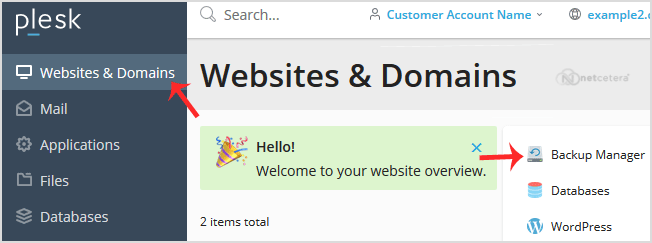
Go to
Websites & Domains
>
Backup Manager
.
3.
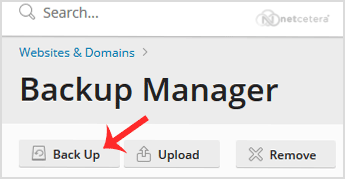
Under
Backup Manager
, click on
Back Up
.
4.
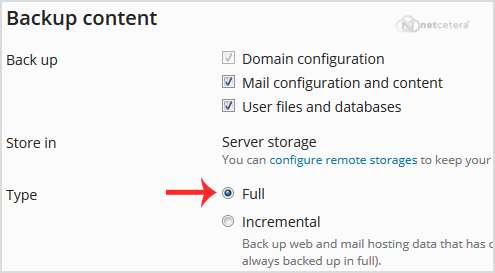
Choose the backup type.
5.
Tick mark
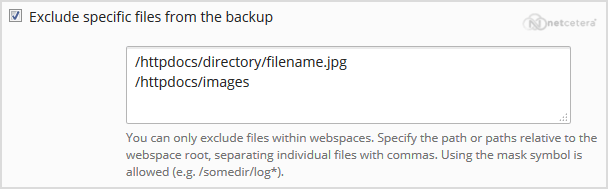
Exclude specific files from the backup
.
Enter the path of the file you wish to exclude, such as:
/httpdocs/directory/filename.jpg
To exclude a whole directory, enter:
/httpdocs/images
To exclude only specific extensions such as PNG, enter:
/httpdocs/images/*.png
6.
Click
Ok,
and the backup will start generating in the background. At this point, you can navigate away from the page.
Share via
Related Articles
How to Include or Exclude a Domain from AutoSSL in cPanel?
How can I search for specific emails?
How can I forward emails to a specific email address automatically?
Categories
13
Accounts and Billing
23
Domain Names
28
Email
16
— OX App Suite
2
Email Client
7
Security
9
Cloud Web Hosting
3
Dedicated/VPS Servers
63
Plesk
50
— Plesk
4
—— Backup/Restore (Plesk)
10
—— CloudLinux (Plesk)
5
—— Databases (Plesk)
6
—— Domain Management (Plesk)
4
—— Email (Plesk)
6
—— FTP (Plesk)
14
—— General (Plesk)
15
cPanel Control Panel
4
Backup/Restore
24
cPanel - Control Panel
6
DNS - Nameservers
16
Email
6
— Mozilla Thunderbird
6
— Outlook 2019
2
Installing a Control Panel
8
Mail Filters & SPAM
11
Mobile
7
— Android
4
— iOS/Apple
3
Others
10
Security
76
Softaculous
16
— Blog
43
— CMS/Portal
15
— Forum
5
SSL (cPanel)
17
WordPress
18
WHM
12
— WHM (For Resellers)
5
— WHM (Root)
7
PayPal
2
General Articles
Tags
.eu domains
.UK Domains
60 day lock
add funds
addon domain
Apple Email
ASP.NET
auto-renewal
bank transfer
billing contacts
cancel
cancellation
catchall
contact billing
control panel
cPanel
credit card
csr
Database
direct debit
disable
dns
domain
domain name prices
domain registrant
Domain Transfers
domains
Email
email forwarding
Export Email
File Manager
forward
FTP
hosting
Import Email
IPSTAG
ispapi
Let's Encrypt
MultiPHP
MVC / CORE
MX
Mx Records
NETC
Nominet
ODBC
ox mac
PHP
PHP Email
plesk
postal invoices
Preview website
RDP
refund
Registrant Email Verification
Remote Desktop Manager
renew
renewal
reseller
root
security
signature
Spam Protection
SSH
SSH Key
ssl
SSL Certificate
SubDomain
support pin
TAG
Transfer
transfer domain
Upload a Website
web-forwarding
webmail
website problem
WHM
whmcs
whois protection
Windows
Windows VPS
Wordpress
© Netcetera
English