Back to website
Login
Home
Login
Back to website
There was a problem loading the comments.
How to Increase PHP's post_max_size value using CloudLinux's Selector in Plesk?
Support Portal
»
Knowledgebase
» Viewing Article
Print
11/12/2020 11:25 AM
CloudLinux (Plesk)
You can modify PHP
post_max_size
as per your needs using CloudLinux PHP Selector in Plesk.
1.
Log in to your Plesk account.
2.
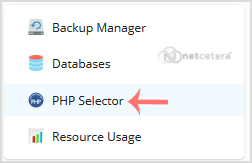
In the right-hand sidebar, click on
PHP Selector
.
3.
Click on the
Options
menu.
Note
: If the
Options
page shows an error related to the native PHP version, change it to a non-native version first.
4
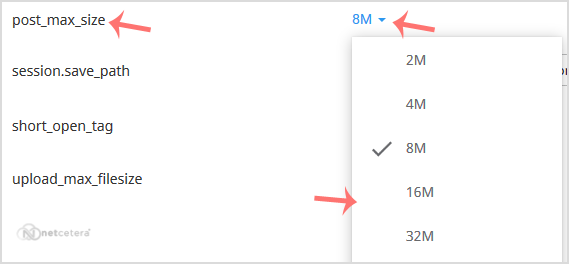
. Look for
post_max_size
and click on the drop-down option displayed in front of it. Then choose the appropriate limit as per your requirements.
Share via
Related Articles
How to Increase PHP's upload_max_filesize value using CloudLinux Selector in Plesk?
How to increase or decrease PHP Memory Limit via CloudLinux Selector in Plesk?
How to Enable or Disable PHP's allow_url_fopen using CloudLinux Selector in Plesk?
Categories
13
Accounts and Billing
23
Domain Names
28
Email
16
— OX App Suite
2
Email Client
7
Security
9
Cloud Web Hosting
3
Dedicated/VPS Servers
63
Plesk
50
— Plesk
4
—— Backup/Restore (Plesk)
10
—— CloudLinux (Plesk)
5
—— Databases (Plesk)
6
—— Domain Management (Plesk)
4
—— Email (Plesk)
6
—— FTP (Plesk)
14
—— General (Plesk)
15
cPanel Control Panel
4
Backup/Restore
24
cPanel - Control Panel
6
DNS - Nameservers
16
Email
6
— Mozilla Thunderbird
6
— Outlook 2019
2
Installing a Control Panel
8
Mail Filters & SPAM
11
Mobile
7
— Android
4
— iOS/Apple
3
Others
10
Security
76
Softaculous
16
— Blog
43
— CMS/Portal
15
— Forum
5
SSL (cPanel)
17
WordPress
18
WHM
12
— WHM (For Resellers)
5
— WHM (Root)
7
PayPal
2
General Articles
Tags
.eu domains
.UK Domains
60 day lock
add funds
addon domain
Apple Email
ASP.NET
auto-renewal
bank transfer
billing contacts
cancel
cancellation
catchall
contact billing
control panel
cPanel
credit card
csr
Database
direct debit
disable
dns
domain
domain name prices
domain registrant
Domain Transfers
domains
Email
email forwarding
Export Email
File Manager
forward
FTP
hosting
Import Email
IPSTAG
ispapi
Let's Encrypt
MultiPHP
MVC / CORE
MX
Mx Records
NETC
Nominet
ODBC
ox mac
PHP
PHP Email
plesk
postal invoices
Preview website
RDP
refund
Registrant Email Verification
Remote Desktop Manager
renew
renewal
reseller
root
security
signature
Spam Protection
SSH
SSH Key
ssl
SSL Certificate
SubDomain
support pin
TAG
Transfer
transfer domain
Upload a Website
web-forwarding
webmail
website problem
WHM
whmcs
whois protection
Windows
Windows VPS
Wordpress
© Netcetera
English